Showing posts with label DSDPlus download. Show all posts
Showing posts with label DSDPlus download. Show all posts

Complete Guide to Digital Speech Decoder - How to decode DMR, P25, NXDN
Complete Guide to Digital Speech Decoder - How to decode DMR, P25, NXDN
DSDPlus 2.71 Released
DSDPlus 2.71 Released
Well the new version of DSDPlus was released tonight for Christmas!
Still no P25 Phase 2!
The rest of it looks amazing you may need to find a new .dll file if you do not have it installed. I will supply a link to the .dll at the bottom of the post.
Well the new version of DSDPlus was released tonight for Christmas!
Still no P25 Phase 2!
The rest of it looks amazing you may need to find a new .dll file if you do not have it installed. I will supply a link to the .dll at the bottom of the post.
DSDPlus version 2.39 which is a FastLane release
DSDPlus version 2.39 which is a FastLane release
Hello everyone, can someone tell me or can i buy DSD version 2.39 ?
Believe you are asking about DSDPlus version 2.39 which is a FastLane release.
Here are the instructions -
DSD+ error message
Just installed DSD+ and dropped the lame_enc.dll into the directory. However, here's what I get:
"The procedure entry point beEncodeChunk could not be located in the dynamic link library ...\DSDPlus1\DSDPlus.exe."
Any ideas as to what might be causing this error? (And, yes, I shortened my path with "..." in the about error message quote, if it's relevant)
I figured I'd give DSD+ a try again but I had issues about a year ago and just stuck with the plain old DSD. It looks like it has some nice features, so I'd finally like to get with the times but I'm stuck.
"The procedure entry point beEncodeChunk could not be located in the dynamic link library ...\DSDPlus1\DSDPlus.exe."
Any ideas as to what might be causing this error? (And, yes, I shortened my path with "..." in the about error message quote, if it's relevant)
I figured I'd give DSD+ a try again but I had issues about a year ago and just stuck with the plain old DSD. It looks like it has some nice features, so I'd finally like to get with the times but I'm stuck.
DMR Decoding with DSDPlus
DMR Decoding with DSDPlus
In this simple guide to setting up DSD, I show what you will need, and how to get started, along with a few other bits of useful information that I'm sure will come in handy when listening to digital voice. I also show some MOTOTRBO going through a repeater, and listening on the repeaters input channel.
In this simple guide to setting up DSD, I show what you will need, and how to get started, along with a few other bits of useful information that I'm sure will come in handy when listening to digital voice. I also show some MOTOTRBO going through a repeater, and listening on the repeaters input channel.
Digital Speech Decoder - How to record to file - TRBO, P25, NXDN
Digital Speech Decoder - How to record to file - TRBO, P25, NXDN
dsd 1.7 for windows compiling from linux to Windows
Can somebody please make a YouTube video on this process….I barely know
how to use Linux. Now you want me to run a compile program?? Step 1
and 2 were easy. Steps 3 through 8 need a hell of a lot more detail for
the average user. so please spare me a few brain cells and I
only started learning about the linux OS because of the Pi.
make the compiled exe available for download
You can use cmake and make to compile the dsd.exe:
install libsndfile-devel, make, cmake and cpp in cygwin, extract both archives and then goto mbelib dir and type:
mkdir build
cd build
cmake ..
make
make install
make the compiled exe available for download
You can use cmake and make to compile the dsd.exe:
install libsndfile-devel, make, cmake and cpp in cygwin, extract both archives and then goto mbelib dir and type:
mkdir build
cd build
cmake ..
make
make install
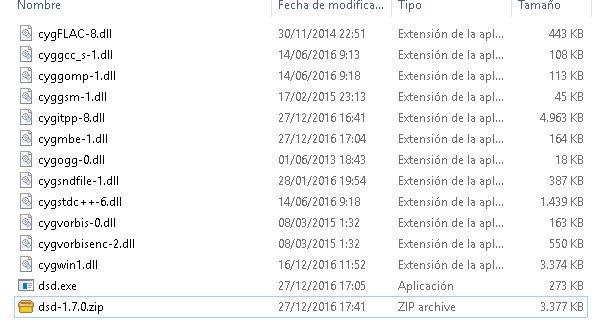
New Version of Digital Speech Decoder DSD+ 1.071 - dsd 1.7 file list
My setup:
Windows XP
One RTL-SDR/USB
SDRsharp SDR v1.0.0.1317
Audio VOICEMEETER (Virtual Mixing Console)

Need help for compile dsd 1.7
Error on DSD-Master/build cmake ..
Windows XP
One RTL-SDR/USB
SDRsharp SDR v1.0.0.1317
Audio VOICEMEETER (Virtual Mixing Console)
Need help for compile dsd 1.7
Error on DSD-Master/build cmake ..
DSDplus Trunking Setup 1.08t
DSDplus Trunking Setup 1.08t
This is how to install DSDplus to do trunking using version 1.08t available from the fast lane early access.
Some note from the maker of DSDplus:
FMP and DSD+ audio device numbers are "different" because FMP uses output devices and you were looking at DSD+ input devices (which is correct when linking to FMP/SDR#); in/out numbers can be different because you might have different devices, like an extra input or output device, which can shift all of the following devices numbers.
Also, if you make a device the default in or out device, it becomes in or out device #1 (IIRC), which again, shifts the other device numbers.
Network and site names have to be manually added to the DSDPlus.networks and DSDPlus.sites files. Systems do not broadcast these names.
When trunk voice following, the four FMP/DSD+ console windows ("DOS windows") do not provide much useful information; they can be minimized (by clicking minimize button in upper right corner of window)
This is how to install DSDplus to do trunking using version 1.08t available from the fast lane early access.
Some note from the maker of DSDplus:
FMP and DSD+ audio device numbers are "different" because FMP uses output devices and you were looking at DSD+ input devices (which is correct when linking to FMP/SDR#); in/out numbers can be different because you might have different devices, like an extra input or output device, which can shift all of the following devices numbers.
Also, if you make a device the default in or out device, it becomes in or out device #1 (IIRC), which again, shifts the other device numbers.
Network and site names have to be manually added to the DSDPlus.networks and DSDPlus.sites files. Systems do not broadcast these names.
When trunk voice following, the four FMP/DSD+ console windows ("DOS windows") do not provide much useful information; they can be minimized (by clicking minimize button in upper right corner of window)
RTL-SDR Tutorial: Following Trunked Radio with Unitrunker
RTL-SDR Tutorial: Following Trunked Radio with Unitrunker
The popular trunking decoding software Unitrunker now supports the RTL2832U R820T RTL-SDR directly in its new version. This means that extra SDR receiver software like SDR# is no longer required to use Unitrunker.
You can download the latest version of Unitrunker here.
In a normal radio system, one company (or talkgroup) might use a single frequency for radio communications. However, this is very inefficient as the frequency may not be in use for the majority of the time. In a trunked radio system, a small set number of frequencies are shared between a large number of talkgroups. Each radio receives a special computer controlled control channel. The control channel determines a vacant frequency that a particular talkgroup should use. This helps to make radio frequency allocations more efficient.
Because a talkgroup might switch between various frequencies often, it can make listening to a conversation difficult for radio scanners. Unitrunker can be used to decode the control channel and follow a voice conversation as it hops across various frequencies. With two RTL-SDR dongles you can set up a trunking receiver station with just Unitrunker. What follows below is a tutorial on how to set this up.
The popular trunking decoding software Unitrunker now supports the RTL2832U R820T RTL-SDR directly in its new version. This means that extra SDR receiver software like SDR# is no longer required to use Unitrunker.
You can download the latest version of Unitrunker here.
In a normal radio system, one company (or talkgroup) might use a single frequency for radio communications. However, this is very inefficient as the frequency may not be in use for the majority of the time. In a trunked radio system, a small set number of frequencies are shared between a large number of talkgroups. Each radio receives a special computer controlled control channel. The control channel determines a vacant frequency that a particular talkgroup should use. This helps to make radio frequency allocations more efficient.
Because a talkgroup might switch between various frequencies often, it can make listening to a conversation difficult for radio scanners. Unitrunker can be used to decode the control channel and follow a voice conversation as it hops across various frequencies. With two RTL-SDR dongles you can set up a trunking receiver station with just Unitrunker. What follows below is a tutorial on how to set this up.
DSD Plus decoding DMR digital voice w/RTL-SDR & SDR+
DSD Plus decoding DMR digital voice with RTL-SDR & SDR+
Complete Guide to Digital Speech Decoder - How to decode DMR, P25, NXDN
Complete Guide to Digital Speech Decoder - How to decode DMR, P25, NXDN
Improved digital voice P25 decoding with DSDPlus
We previously posted about the DSD digital decoding software
and it’s usefulness with the RTL-SDR dongle and other signal sources.
Now there’s a newly released version known as DSDPlus which promises to
deliver improved decoding and clearer audio of unencrypted APCO Project
25 (P25) radio signals.

This program is designed to be used with your RTL-SDR receiver software such as SDR#, with the receiver’s output piped to the DSDPlus program using a program such as Virtual Audio Cable or similar. Unfortunately, DSDPlus is a Windows-only offering at this time, and the anonymous author isn’t releasing the source.
DSDPlus is available for download from MEGA. You can find more the program user guide in the README file.
DSDPlus is available for download

This program is designed to be used with your RTL-SDR receiver software such as SDR#, with the receiver’s output piped to the DSDPlus program using a program such as Virtual Audio Cable or similar. Unfortunately, DSDPlus is a Windows-only offering at this time, and the anonymous author isn’t releasing the source.
DSDPlus is available for download from MEGA. You can find more the program user guide in the README file.
DSDPlus is available for download
Subscribe to:
Posts (Atom)